High-quality Airplane Travel Silhouettes
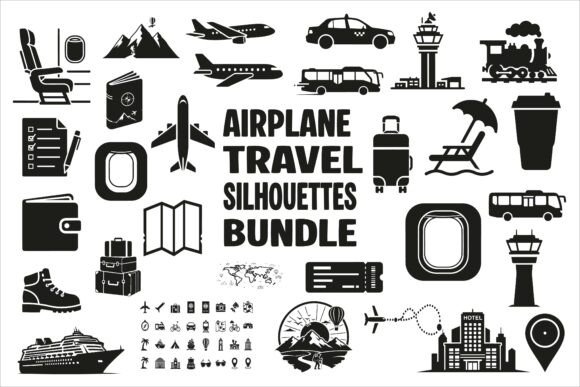
High-quality Airplane Travel Silhouettes are precision-crafted vector and raster assets designed for immediate, reliable use across professional and creative workflows. They’re not decorative afterthoughts—they’re functional design components: clean black outlines of commercial jets, regional passenger planes, private aircraft, airport scenes, boarding gates, and flight paths—optimized for clarity at any scale and seamless integration into both digital interfaces and physical print.
These silhouettes serve a distinct role in the asset pipeline: they bridge conceptual intent with visual execution. When you’re designing a travel blog’s header, building an aviation-themed educational infographic, or developing branded merchandise for a boutique airline tour company, High-quality Airplane Travel Silhouettes eliminate the friction of sourcing, editing, or redrawing consistent aviation iconography from scratch.
Where They Fit in Your Workflow
They enter your process early—not as a final polish, but as a foundational element. For marketers launching a summer travel campaign, these silhouettes become part of the brand’s visual shorthand before copy is finalized. A freelance designer working on a client’s airport lounge signage system uses the SVG files to test layout responsiveness across kiosk screens and printed wayfinding maps—same asset, multiple outputs, zero rework.
In publishing, educators preparing a geography unit on global air traffic routes drop the scalable vector files directly into lesson slides or printable worksheets. Because each silhouette maintains crisp edges whether scaled to 24px or 2400px, there’s no need to juggle multiple resolutions or compromise legibility. That consistency reduces QA time and avoids last-minute substitutions that derail deadlines.
Format Flexibility Meets Real-World Constraints
The collection includes 30 EPS, 30 JPG, 30 PNG (with transparent backgrounds), 30 SVG, 30 PDF, and 30 AI files—deliberately structured to match how professionals actually work. You don’t need all formats at once. You choose based on context:
- SVG for web banners, interactive maps, or responsive landing pages where resolution independence matters;
- PNG with transparency for layered social media graphics, t-shirt mockups, or sticker designs that overlay complex backgrounds;
- AI and EPS when you need to adjust stroke weight, recolor elements, or integrate cleanly into larger Illustrator-based branding systems;
- JPG for quick email attachments, internal presentations, or CMS uploads where file size and universal compatibility outweigh editability;
- PDF for print-ready layouts in InDesign or direct submission to packaging vendors who require flattened, prepress-safe files.
This breadth isn’t about redundancy—it’s about eliminating format-related bottlenecks. A small business owner updating their travel agency’s brochure doesn’t pause to convert files or hunt for compatible versions. They open the folder, pick the right format for the tool they’re using, and move forward.
Integration With Tools You Already Use
These silhouettes slot into existing software without conversion steps or plugin dependencies. Adobe Creative Cloud users open AI or EPS files natively in Illustrator, adjust anchor points or grouping logic, and export to new specifications in seconds. Canva creators drag and drop the PNG or SVG versions directly onto templates—no background removal needed, no pixelation on export.
For developers embedding icons into custom dashboards or travel booking widgets, the SVG files are ready for inline use or CSS manipulation: change color via fill, animate entry with transform, or bind to data-driven flight status indicators. No external font libraries or icon sets required—just lightweight, semantic vector markup.
Even non-designers benefit. A blogger writing about sustainable aviation can insert a PNG silhouette beside a statistic (“CO₂ emissions per passenger-kilometer dropped 50% since 2005”) without opening Photoshop. The visual reinforces the message without demanding technical skill.
Preparation and Organization That Saves Time Later
The files are named predictably and logically—boeing-787-silhouette.svg, private-jet-turboprop-side-view.png, airport-terminal-overhead.svg—so searching within project folders or DAM systems returns accurate results instantly. There’s no “jet_01_v2_final_FINAL_v3.png” clutter. This naming discipline supports long-term asset management, especially across teams: designers, developers, and content managers reference the same clear identifiers.
Because each silhouette is built on a consistent visual language—uniform line weight, proportional accuracy, and intentional negative space—they coexist without visual competition. You can combine a regional turboprop, a control tower, and a luggage carousel in one infographic and maintain hierarchy and readability. That cohesion reduces revision rounds and strengthens brand recognition over time.
Quality Control Built Into Every File
“High-quality” here means more than sharp edges. It means deliberate attention to aviation accuracy: wing sweep angles match real-world models, landing gear placement reflects actual geometry, and fuselage proportions distinguish narrow-body from wide-body jets at glance. This matters for credibility—especially in educational, journalistic, or regulatory contexts where visual precision supports trust.
Transparency is fully alpha-channel clean in PNGs—no fringing, no semi-transparent halos. SVG paths are simplified but retain necessary detail; no unnecessary nodes slow rendering or complicate editing. EPS files preserve layers where relevant (e.g., separate cockpit, wings, and tail sections) so advanced users can isolate and modify components without rebuilding.
Practical Implementation Across Common Scenarios
For t-shirt designers: Start with the PNG or SVG version, place it on a mockup template, then apply your brand’s Pantone spot color using Illustrator’s Recolor Artwork tool. The transparent background ensures clean fabric printing.
For educators building digital lessons: Import the SVG into Google Slides or PowerPoint as an editable vector. Group it with text boxes and arrows to build annotated diagrams—then export the entire slide as PDF for student handouts.
For app developers: Use the SVG files to generate icon variants (1x, 2x, dark mode) via automated build scripts. Embed them as inline SVG for fast loading and accessibility support (add aria-label for screen readers).
For small business owners ordering decals: Send the EPS or PDF directly to your vendor. No need to explain “make it bigger” or “remove the white box”—the files arrive production-ready.
Long-Term Usability and Scalability
This isn’t a one-off download. It’s an asset library you’ll return to across projects, years, and platforms. As your needs evolve—from static posters to animated social ads to AR-enabled travel brochures—the SVG and AI files remain usable without degradation. You won’t outgrow them.
And because they’re intentionally minimal (black silhouettes, no gradients or textures), they adapt to changing design trends. A 2025 minimalist UI or a 2030 retro-futurist campaign can both deploy the same Boeing 737 silhouette—just recolored, resized, or composited differently. That longevity protects your investment and reduces recurring creative overhead.
High-quality Airplane Travel Silhouettes don’t replace strategy or storytelling. They support them—by removing visual friction, enforcing consistency, and giving you predictable, professional-grade assets exactly when and where you need them.