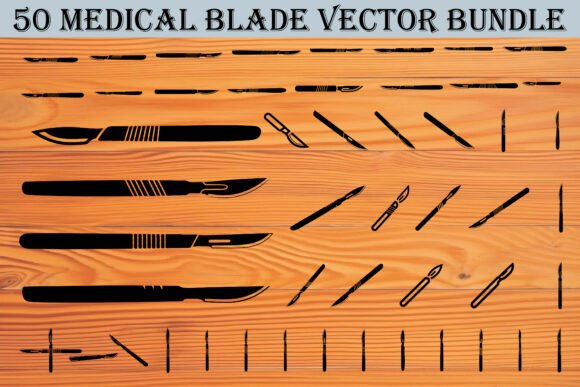
50 Medical Blade Vector Bundle
Whether you're illustrating a surgical procedure for a medical textbook, designing an interactive anatomy app, or creating patient education posters for a clinic, visual accuracy and flexibility matter. The 50 Medical Blade Vector Bundle delivers precisely that: a curated, professionally drawn set of 50 distinct surgical blade and scalpel silhouettes—each crafted in a bold, clean, minimal black style. Unlike generic clipart or low-resolution stock images, this collection prioritizes anatomical fidelity, design versatility, and technical readiness across platforms and workflows.
Why Precision Tools Demand Precision Assets
Medical illustration isn’t just about aesthetics—it’s about clarity, consistency, and credibility. A misaligned blade angle or inconsistent handle proportion can confuse learners, undermine clinical messaging, or weaken brand authority. Today’s creators—from freelance medical animators to university instructional designers—are under increasing pressure to produce high-fidelity visuals quickly, without sacrificing nuance. That’s where purpose-built vector assets like the 50 Medical Blade Vector Bundle become more than convenient—they become workflow essentials.
Consider how surgical education has evolved: static diagrams are giving way to layered, interactive learning modules; printed manuals now coexist with responsive web interfaces; and regulatory compliance often requires scalable, accessible, and editable graphics. Vectors meet all three requirements. Because every file in this bundle is natively vector-based (SVG, EPS, AI), it retains crispness at any scale—from thumbnail icons on a mobile health app to life-size wall charts in a teaching hospital.
Designed for Real-World Flexibility, Not Just Theory
The bundle includes not only classic #10, #11, #15, and #20 blades but also less commonly depicted variations—curved handles, angled tips, double-edged profiles, and ergonomic grips. This diversity reflects actual clinical usage, not just textbook conventions. For example, a public health campaign explaining wound debridement might pair a #15 blade with a curved handle to show precise tissue removal, while a surgical residency program could use side-angle views to demonstrate proper grip orientation during suturing practice.
Each format serves a practical role: SVG files integrate seamlessly into modern web development pipelines; EPS and AI files allow deep editing in professional design suites; PNGs with transparent backgrounds drop cleanly into presentations or UI mockups; and print-ready JPGs and PDFs ensure consistent output for handouts, posters, or conference materials. No re-exporting, no pixelation, no licensing ambiguity—just ready-to-deploy assets aligned with current production standards.
Meeting Modern Creative & Educational Demands
Educators increasingly rely on multimodal resources—combining video, annotation tools, and downloadable handouts. A single blade vector can appear as a labeled element in a PDF worksheet, animate smoothly in an SVG-based explainer, and reappear as a clickable icon in a learning management system. That cross-format utility reduces duplication of effort and strengthens visual continuity across learning touchpoints.
Similarly, healthcare marketers building awareness campaigns around minimally invasive procedures benefit from vectors that convey precision without clinical coldness. The clean, minimalist aesthetic of the 50 Medical Blade Vector Bundle avoids overly graphic realism while retaining enough detail to signal expertise and intentionality—ideal for brochures targeting patients or investor decks highlighting surgical device innovation.
How Professionals Are Actually Using These Vectors
Real-world application reveals what matters most: speed, adaptability, and contextual appropriateness. A freelance medical illustrator recently used four different blade variants from the bundle to build a step-by-step laparoscopic toolkit guide—recoloring handles to match hospital branding and layering them over procedural flowcharts in Figma. A university anatomy department embedded the SVGs directly into an open-access online course, enabling students to zoom into blade edges without loss of clarity during self-paced study.
Meanwhile, a small medtech startup leveraged the AI files to create custom UI icons for their pre-op checklist app—swapping black outlines for soft blue strokes and adjusting stroke weight to meet WCAG contrast guidelines. None required external illustration support. All maintained visual cohesion across iOS, Android, and web versions.
Editing Without Compromise
Because the bundle includes native Adobe Illustrator (.ai) files alongside industry-standard EPS and SVG formats, users retain full control over paths, layers, and grouping. You’re not locked into preset colors or fixed dimensions. Need to isolate a blade tip for magnification? Ungroup and edit. Want to match a specific Pantone for branded training materials? Recolor with one click. Preparing for offset printing? Export CMYK-optimized JPGs or PDFs with embedded fonts and bleed settings.
This level of editability supports evolving needs—like updating illustrations to reflect new FDA-approved instruments or adapting visuals for international audiences where certain blade types are more common. It also future-proofs projects: as design systems mature and component libraries expand, having modular, well-structured vectors means these assets remain reusable—not retired after one campaign.
Supporting Ethical, Accessible, and Inclusive Communication
Good medical design respects both the subject matter and the audience. These vectors avoid sensationalism or unnecessary realism—striking a balance between clinical accuracy and approachable clarity. That makes them suitable for diverse contexts: explaining surgical options to non-native English speakers, supporting neurodiverse learners with simplified iconography, or creating inclusive educational content that centers understanding over intimidation.
Transparency in file structure and licensing also supports ethical use. With no attribution requirements or restrictive clauses, professionals can confidently integrate these assets into institutional materials, grant-funded projects, or publicly shared resources—without legal overhead or last-minute redesigns.
Where This Fits in Today’s Visual Landscape
We’re moving past the era of “good enough” medical graphics. Patients research procedures online before appointments. Students compare open-source anatomy atlases side-by-side with commercial apps. Clinicians share visual notes across telehealth platforms. In each case, clarity, consistency, and technical reliability aren’t optional extras—they’re baseline expectations.
The 50 Medical Blade Vector Bundle responds to that shift by offering rigor without complexity. It doesn’t try to replace expert illustration—but it removes friction where illustration isn’t the core value. It empowers educators to focus on pedagogy, not pixel alignment. It lets developers embed meaningful icons without outsourcing design. And it gives small practices and startups access to the same foundational assets once reserved for large publishers or corporate R&D teams.
A Practical Starting Point
If you’re evaluating whether this bundle fits your needs, ask two questions: First, do you regularly need accurate, scalable representations of surgical blades—and do those representations need to adapt across formats, sizes, and color schemes? Second, does your current process involve workarounds—like tracing raster images, paying for custom illustrations, or settling for stylistically mismatched assets?
For many professionals, the answer is yes—to both. And that’s where the 50 Medical Blade Vector Bundle transitions from helpful resource to essential tool: not because it promises transformation, but because it reliably removes repetition, reduces risk, and supports better communication—one precise, editable, thoughtfully designed blade at a time.