Tennis Racket Icon Silhouette Bundle
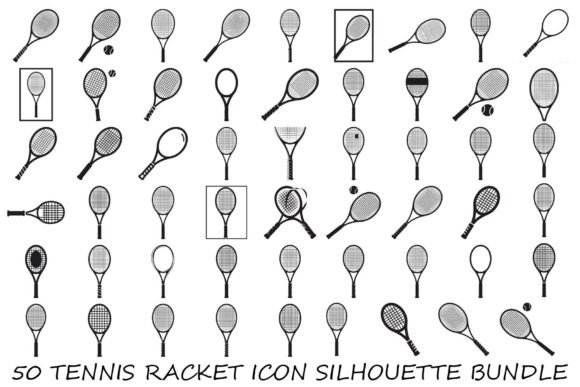
If you're designing for sports, fitness, or active lifestyles — whether for a client’s branding project, your own apparel line, or classroom materials — finding clean, versatile, and professionally drawn icons can make or break the final result. The Tennis Racket Icon Silhouette Bundle solves that exact challenge: 50 distinct tennis racket silhouettes, each crafted with precision and purpose, all in crisp black-and-white vector form.
What sets this collection apart isn’t just quantity — it’s intelligent variety. You’ll find rackets shown from multiple angles: side profiles, top-down views, angled grips, overhead string patterns, and even dynamic combinations with tennis balls mid-swing or resting on the frame. No two icons repeat the same posture or detail emphasis. That means you’re not just choosing *a* racket — you’re selecting the right visual language for your message: authority, motion, elegance, tradition, or modern minimalism.
Why Clean Silhouettes Matter More Than You Think
Silhouettes are more than stylistic choices — they’re functional tools. In branding, a strong silhouette reads instantly at small sizes (think app icons or social avatars). In print, they reproduce flawlessly on fabric, vinyl, or engraved metal without color bleed or registration issues. And for digital use — especially in infographics or UI elements — high-contrast black-and-white graphics load faster, scale infinitely, and adapt seamlessly to dark or light mode interfaces.
This Tennis Racket Icon Silhouette Bundle delivers exactly that: fully scalable vectors with no raster artifacts, zero pixelation, and no hidden layers or embedded effects. Every icon is built with clean anchor points, consistent stroke weights, and intentional negative space — making them easy to recolor, resize, or layer without guesswork.
Real-World Uses Across Industries
Designers and marketers use these icons daily — but their utility extends far beyond logos and websites:
- Fitness studios drop them into class schedules, membership cards, and Instagram Stories to reinforce sport-specific identity without clutter.
- Educators embed them into PE curriculum handouts, tournament brackets, or student-made posters — clear visuals help learners grasp concepts faster than text alone.
- Cricut and Silhouette crafters import the SVG or EPS files directly into design software, then cut precise stencils for mugs, tote bags, or wall decals — no tracing or redrawing needed.
- App developers and SaaS teams integrate PNG or SVG versions into dashboards or progress trackers where tennis-themed milestones (e.g., “Serve Accuracy,” “Match Wins”) need intuitive, lightweight icons.
- Small business owners use the AI or PDF files to mock up branded merchandise — t-shirts, water bottles, or event banners — knowing every icon will hold up on screen and in production.
Even laser engravers and sign shops appreciate the bundle’s technical readiness: paths are closed, strokes are outlined, and no transparency or gradient dependencies exist. That translates to fewer prepress corrections and faster turnaround on physical products.
File Flexibility Without Compromise
You get 50 icons in six formats — AI, EPS, SVG, PNG, JPG, and PDF — totaling 300 ready-to-use assets. That’s not redundancy; it’s workflow intelligence.
Use AI and EPS when you need full editability in Adobe Illustrator or CorelDRAW — adjusting string tension lines, reshaping handles, or merging with custom typography. Choose SVG for responsive web use: it scales cleanly across devices and supports CSS animation or interactivity. For quick drag-and-drop in Canva, PowerPoint, or email templates? PNG (with transparent background) works reliably. Need a print-ready proof or client presentation? PDF preserves fidelity and opens universally. Even JPG has its place — like embedding into blog posts or social media ads where vector support isn’t guaranteed.
Commercial Use Done Right
All icons are licensed for both personal and commercial projects — no attribution required. That means you can use them in client deliverables, sell printed posters, license designs to retailers, or include them in digital templates sold on marketplaces — all without legal friction.
But “commercial use” only matters if the assets perform. These icons were built with real constraints in mind: no overlapping paths that cause cutting errors, no stray points that crash older Cricut firmware, no inconsistent stroke widths that break alignment in multi-icon grids. They’ve been tested across platforms — from Figma to Silhouette Studio to Adobe Express — so what you see is what ships.
Practical Tips Before You Start
Before diving in, consider your end use first. If you’re designing for embroidery or heat transfer vinyl, stick with SVG or EPS — raster formats like JPG won’t hold detail at tiny sizes. For social media banners, test how the icons render at thumbnail size: sometimes a simplified side-view icon communicates faster than a complex overhead string pattern.
Also, don’t overlook the power of consistency. Even with 50 options, limiting yourself to 2–3 complementary styles (e.g., one grip-focused, one ball-in-frame, one minimalist outline) builds stronger visual rhythm across a campaign or product line.
And remember: scalability doesn’t mean automatic harmony. A 500px icon looks sharp — but when scaled down to 24px for a mobile menu, subtle details vanish. Preview at actual usage sizes early. That’s where the clean silhouette approach shines: essential shape remains legible, even when fine string lines fade.
The Tennis Racket Icon Silhouette Bundle isn’t about filling a folder with icons. It’s about having the right visual tool, ready when you need it — whether you’re launching a tennis academy website, prepping a school sports day flyer, or prototyping a new fitness app. It saves time not by offering shortcuts, but by removing roadblocks: compatibility issues, scaling compromises, licensing uncertainty, or aesthetic mismatch. That kind of reliability is rare — and worth building into your creative workflow.