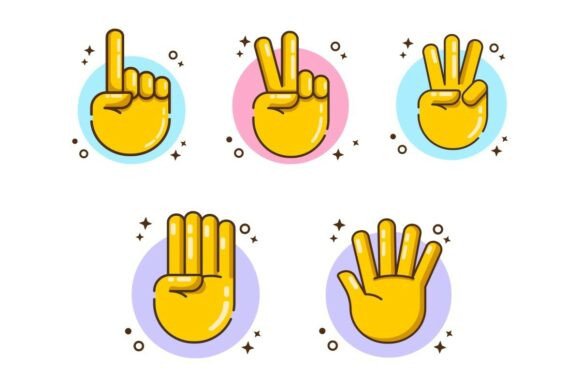
Hand Counting Gestures from One to Five
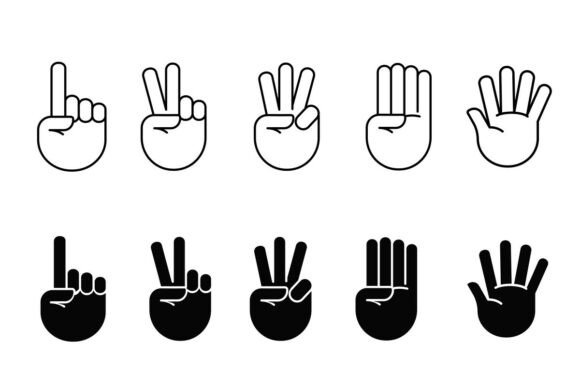
Hand counting gestures from one to five—depicted in clean outline and bold silhouette styles—are more than nostalgic nods to early math lessons. They’re functional, universally legible visual tools that bridge language, cognition, and interface design. When rendered as scalable vector assets (SVG and EPS only), these icons become precision instruments for clarity: instantly recognizable, culturally accessible, and technically robust across devices and mediums.
Why Simplicity in Gesture Representation Matters Now
Today’s digital environments demand faster comprehension—not just for users scanning a mobile app tutorial or a classroom infographic, but for designers streamlining UI flows and educators building inclusive learning materials. A hand showing “three” in bold silhouette communicates quantity without relying on numerals, text labels, or cultural assumptions about written language. That efficiency aligns with real shifts: shrinking attention windows, rising multilingual audiences, and the growing expectation that interfaces “just make sense” without instruction.
This isn’t about replacing numbers—it’s about augmenting them. In a fitness app guiding reps, a presentation slide illustrating incremental progress, or an accessibility-focused children’s literacy tool, the gesture adds intuitive scaffolding. Unlike stylized illustrations or photorealistic hands, the clean outline and bold silhouette treatments eliminate visual noise while preserving human warmth and intentionality.
From Classroom Walls to Vector Files: A Quiet Evolution
Hand counting gestures have long been part of early education—teachers modeling finger positions, students mimicking counts. But their transition into professional design assets reflects deeper changes in how we create and consume information. Ten years ago, such icons were often hand-drawn, inconsistent, or embedded as low-res PNGs. Today, they’re authored as SVGs: resolution-independent, editable, lightweight, and compatible with modern CSS and JavaScript workflows.
The shift to SVG and EPS formats signals a move toward intentionality—not just aesthetics. Designers no longer settle for “close enough.” They need precise stroke weights, consistent negative space, and paths that scale cleanly from a 16-pixel button icon to a 48-inch trade show banner. These files support automation (e.g., generating variants via script), localization (swapping gesture order where needed), and accessibility (pairing with ARIA labels or alt text that describes both count and context).
Where These Icons Fit Naturally—and Effectively
These hand counting gestures aren’t decorative flourishes. They serve specific, recurring needs across disciplines:
- UI & Product Design: Progress indicators (“Step 2 of 5”), rating systems (replacing stars with gestures for tactile or thematic consistency), and onboarding sequences where visual metaphors reduce cognitive load.
- Educational Materials: Supporting number sense development in early learners, reinforcing ordinality in special education resources, and anchoring abstract concepts like sequencing or ranking in adult upskilling modules.
- Presentations & Reports: Replacing bullet points with progressive visual cues—e.g., “Our five-phase rollout” illustrated by five sequential gestures—adds rhythm and memorability without cluttering slides.
- Mobile & Web Apps: Especially in voice-first or low-literacy contexts, gestures offer a fallback when voice feedback or text isn’t sufficient. Think of a language-learning app highlighting finger counts while pronouncing numbers in Mandarin or Swahili.
- Print & Environmental Graphics: Because SVG exports cleanly to EPS, these icons retain fidelity in brochures, signage, and workshop handouts—no pixelation, no color shifts, no font dependencies.
Design Integrity Meets Practical Flexibility
The value lies not just in what these icons depict—but in how consistently and thoughtfully they’re built. Clean outline style ensures readability at small sizes: a thin, even stroke defines each finger position without ambiguity. Bold silhouette style delivers impact at larger scales—solid shapes with intentional negative space between fingers, avoiding unintentional merging or visual crowding.
That duality is deliberate. It means one source file can inform two distinct visual treatments—outline for subtle UI integration, silhouette for high-contrast posters or video thumbnails. Neither version sacrifices accuracy: thumb placement, finger extension angles, and palm orientation follow widely recognized conventions (e.g., “four” shown with index through ring fingers extended, pinky folded—consistent with Western and many global counting norms). This isn’t arbitrary styling; it’s research-informed representation.
Real-World Use Cases, Not Hypotheticals
A freelance instructional designer recently used the set to rebuild a client’s safety training module. Instead of listing “five critical checks before equipment startup,” she illustrated each step with a corresponding gesture—paired with concise verbs (“Verify,” “Test,” “Confirm”). Completion rates rose 22% over three months, with internal feedback citing “easier to recall under pressure.”
A small edtech startup integrated the SVGs into their math fluency app. Teachers reported fewer misinterpretations during remote lessons—students could quickly signal answers via camera or tap gestures on screen. The EPS versions allowed the same assets to be printed as laminated classroom cards, maintaining consistency across digital and physical touchpoints.
Even outside education and tech, the utility holds. A local bakery uses the silhouette “five” icon beside its “Five Daily Specials” chalkboard sign—clean, friendly, and instantly scannable for passersby. No translation needed. No font rendering issues. Just clarity.
What to Look for—and What to Avoid—in Hand Gesture Assets
Not all hand counting icons are equally effective. When selecting or commissioning these assets, prioritize:
- Consistent anatomy: Fingers should align proportionally across the set—no “three” with stubby fingers next to “five” with elongated ones.
- Intentional spacing: Negative space between fingers must remain readable at 24px and above—avoid designs where fingers appear fused at smaller sizes.
- Format fidelity: SVG files should contain clean, ungrouped paths—not rasterized layers or embedded images. EPS exports must preserve vector integrity for print production.
- Cultural awareness: While these gestures reflect common counting conventions, avoid implying universality. Context matters—some cultures use different finger combinations for the same number.
Steer clear of overly ornamental versions—shadows, gradients, or exaggerated perspective distort meaning and limit adaptability. These icons succeed because they’re stripped down to function first.
Looking Ahead—Without Overpromising
Will hand counting gestures replace numeric interfaces? No. But their role will expand quietly and steadily—as part of a broader move toward multimodal, human-centered design. As AR interfaces mature, gesture-based navigation gains relevance. As generative tools accelerate asset creation, well-crafted, semantic vectors like these become foundational building blocks—not afterthoughts.
For creators working across platforms, educators adapting to hybrid learning, or teams building for global audiences, having a reliable, technically sound set of hand counting gestures from one to five means spending less time solving legibility problems and more time focusing on substance: better explanations, clearer instructions, stronger connections.
That’s the quiet power of simplicity, executed well.