Magnifying Glass Silhouette Icon Vector: A Design Asset for Clarity, Functionality, and Universal Communication
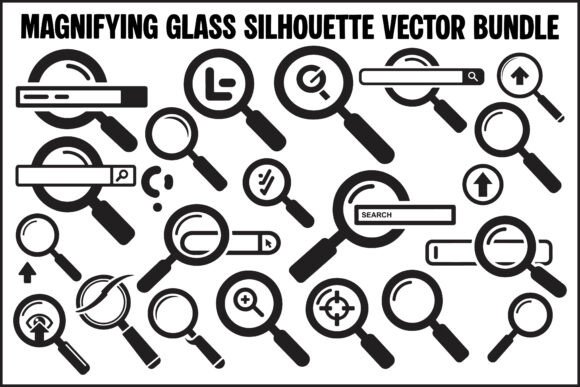
Icons are more than decorative flourishes—they’re functional signposts. In digital interfaces, presentations, and printed materials, they guide attention, signal action, and compress complex ideas into instantly recognizable forms. Among the most enduring and versatile of these is the magnifying glass: a symbol rooted in human curiosity, investigation, and precision. The Magnifying Glass Silhouette Icon Vector bundle distills that universal meaning into a cohesive, technically refined set—designed not just to look clean, but to perform reliably across contexts, scales, and workflows.
Why This Silhouette Approach Works Across Disciplines
The decision to render each icon as a bold, black silhouette isn’t stylistic shorthand—it’s intentional functional design. A monochromatic silhouette eliminates color-related ambiguity (e.g., cultural associations or accessibility contrast issues), ensures consistent legibility at small sizes, and provides maximum flexibility for downstream customization. Unlike filled or gradient-based icons, these silhouettes serve as neutral canvases: designers can recolor them in seconds, layer them over photos or gradients, or invert them for dark-mode interfaces—all without compromising clarity.
This neutrality makes the Magnifying Glass Silhouette Icon Vector especially valuable for educators building interactive learning modules, researchers visualizing data exploration workflows, or business owners designing customer-facing dashboards. A single icon—say, the “zoom-in” variant—can represent data drill-down in an analytics report, image enlargement in an e-commerce gallery, or step-by-step inspection in a manufacturing SOP—without requiring contextual explanation.
File Formats That Match Real-World Technical Needs
A well-designed icon is only as useful as its deliverables. This bundle includes four distinct file formats—each addressing specific production requirements:
- SVG files (20 total): Scalable, lightweight, and natively supported by all modern browsers. Ideal for responsive web interfaces where icons must adapt fluidly from mobile screens to 4K displays. SVGs also allow dynamic styling via CSS—meaning one icon file can power dozens of color variants or hover states without bloating page weight.
- PNG files (20 total): High-resolution raster assets with transparent backgrounds. These are ready for immediate use in slide decks, social media graphics, documentation screenshots, or platforms that don’t support vector rendering (like certain email clients or legacy CMS editors). Their crisp edges eliminate fuzzy scaling artifacts common in auto-resized JPEGs.
- EPS files (20 total): Industry-standard vector format compatible with Adobe Illustrator, CorelDRAW, and other professional design suites. EPS ensures pixel-perfect fidelity when preparing large-format prints—think trade show banners, instructional posters, or lab signage—where subtle curve smoothness directly impacts perceived quality.
- JPG files (20 total): Optimized for preview, mockup integration, and thumbnail generation. With solid white backgrounds, they drop seamlessly into wireframing tools, client presentations, or style guide PDFs where transparency isn’t required—and load faster than vector previews in non-design applications.
Crucially, all 20 icons maintain identical visual rhythm and proportion across formats. Whether you’re adjusting stroke weight in Illustrator (EPS), tweaking fill opacity in Figma (SVG), or placing a PNG over a textured background in PowerPoint, the underlying design language remains coherent.
Practical Applications Beyond UI Kits
While UI/UX teams are natural adopters, the utility of this Magnifying Glass Silhouette Icon Vector extends far beyond software interfaces:
Educators and instructional designers embed these icons into digital worksheets to denote “find evidence,” “analyze this chart,” or “compare perspectives.” A student seeing the same zoom-out icon in a history timeline, a science diagram, and a literature annotation tool builds intuitive mental models about scale and scope.
Researchers and analysts use the “lookup” and “inspection” variants in methodological diagrams—mapping how datasets are queried, validated, or cross-referenced. Because the icons avoid literalism (e.g., no lens glare or hand grip), they remain focused on the cognitive act—not the physical tool.
Hobbyists and makers integrate the SVG versions into laser-cut templates, embroidery patterns, or CNC routing guides. The clean silhouette translates precisely to physical substrates; no anti-aliasing or edge bleeding compromises cut accuracy.
Business owners launching SaaS products deploy the PNG and SVG sets across landing pages, onboarding flows, and help center articles. Consistent iconography reduces cognitive load during feature discovery—users learn once how “search” looks, then recognize it instantly across search bars, filter menus, and contextual tooltips.
Design Integrity Meets Practical Flexibility
“Bold, minimal, and well-balanced” isn’t marketing speak—it describes measurable traits. Each icon in the bundle adheres to strict visual constraints: uniform stroke weight (where applicable), consistent negative space ratios, and geometric alignment that survives extreme scaling. The “search” icon, for example, avoids thin handles or delicate curves that vanish below 16px. Instead, its circular frame and centered lens maintain structural integrity even as a favicon.
This balance enables what designers call “progressive disclosure”: users perceive the icon’s purpose immediately at a glance, yet discover nuanced meaning upon closer interaction. Hover over a “zoom-in” icon in a web app? It might animate subtly—or trigger a tooltip explaining “expand view to see regional trends.” The underlying vector ensures that animation remains crisp at any resolution.
Equally important is the absence of visual noise. There are no shadows, gradients, or skeuomorphic textures. That restraint isn’t minimalism for its own sake—it prevents visual competition with surrounding content. In a data-dense dashboard, a cluttered icon distracts from critical metrics. A clean silhouette directs focus where it belongs: the information being searched, inspected, or enlarged.
Implementation Considerations for Long-Term Use
Adopting any icon set requires attention to sustainability—not just aesthetics. Here’s what makes this Magnifying Glass Silhouette Icon Vector adaptable over time:
- Accessibility-first structure: All SVG files include descriptive
titleanddescelements, supporting screen readers. When paired with proper ARIA labels in code, they meet WCAG 2.1 success criteria for informative icons. - Version control readiness: Because each format is delivered as discrete, named files (e.g.,
magnify-search.svg,magnify-inspect.png), teams can version-control assets alongside code—ensuring design consistency across product iterations. - Localization resilience: Icons representing universal actions (“search,” “zoom”) require no translation. This simplifies international rollout—no need to rework iconography for RTL languages or culturally specific metaphors.
- Print-to-digital continuity: The EPS and high-DPI PNG files ensure that training manuals, conference handouts, or workshop materials retain the same visual authority as their digital counterparts—reinforcing brand coherence across touchpoints.
For creators managing multiple projects, the bundle’s organization—20 distinct concepts, each available in four formats—avoids the time sink of converting or resizing single-format downloads. Need a 32px PNG for a mobile menu and a 2000px EPS for a tradeshow backdrop? Both exist, pre-optimized, in the same folder structure.
When Simplicity Enables Sophistication
In an era of increasingly complex interfaces, the value of clear, unambiguous visual language grows—not diminishes. The Magnifying Glass Silhouette Icon Vector succeeds because it refuses to overcomplicate its core purpose: to signal inquiry, reveal detail, and invite closer examination. Its strength lies in what it omits—extraneous detail, stylistic trend-chasing, or format limitations—as much as what it delivers.
That restraint makes it equally at home in a university physics department’s open-access simulation tool, a nonprofit’s community health survey platform, or a freelance developer’s portfolio site. It doesn’t shout for attention; it waits patiently, legible and reliable, until the user needs to search, inspect, zoom, or understand something more deeply. And in doing so, it fulfills the quiet, essential role of all great design: making complexity feel simple, one precise, scalable silhouette at a time.