AURA Monthly Status Report PowerPoint: A Comprehensive Tool for Project Management
When it comes to managing projects effectively, having the right tools can make all the difference. The AURA Monthly Status Report PowerPoint is a powerful solution that helps teams track progress, communicate updates, and maintain clarity across all stages of a project. With its extensive collection of slides and customizable features, this template offers a structured approach to presenting monthly reports, making it an essential asset for any organization.
Key Features of the AURA Monthly Status Report PowerPoint Template
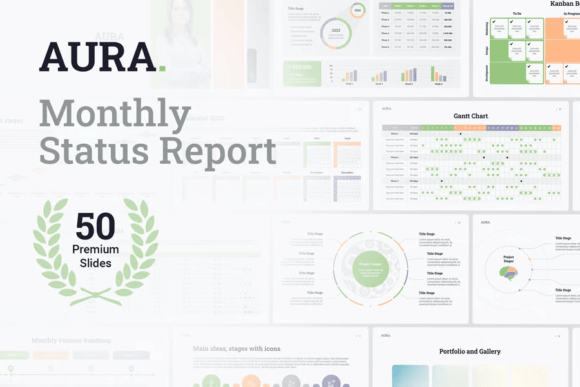
The AURA Monthly Status Report PowerPoint includes 50 unique slides, each designed to serve a specific purpose in project management. From basic text slides to visually engaging presentations with photos, the template ensures that every aspect of a project can be clearly communicated. These slides are not only functional but also aesthetically pleasing, allowing users to create professional-looking reports without requiring advanced design skills.
One of the standout features of the template is its ability to incorporate main ideas and stages using icons. This visual representation makes it easier for stakeholders to grasp complex information quickly. Additionally, the portfolio and gallery slides allow for showcasing completed work, while the timeline slide provides a clear overview of project milestones and deadlines.
The pricing tables and lists of numbered and bullet points offer a structured way to present financial data and key project details. By including pros and cons sections, the template encourages critical evaluation of project strategies, helping teams identify areas for improvement and optimization.
Business-Focused Slides for Effective Project Tracking
Beyond the base slides, the AURA Monthly Status Report PowerPoint also includes business-specific slides that support more detailed project tracking. The stages and step-by-step slides provide a clear breakdown of project phases, ensuring that all team members understand their roles and responsibilities. The Gantt chart slide is particularly useful for visualizing project timelines and dependencies, enabling teams to manage resources more efficiently.
The plan versus actual result slide allows for comparing projected outcomes with real-time performance, making it easier to adjust strategies as needed. The KPI dashboard offers a centralized view of key performance indicators, giving managers a quick snapshot of project health. The Kanban board and roadmap template further enhance project organization by providing visual tools for task management and long-term planning.
The agile project process and waterfall vs. agile infographic scheme help teams choose the most suitable project management methodology based on their needs. These slides facilitate discussions around project approaches and ensure alignment among team members. The calendar templates for 2023 and 2024 provide a structured way to plan and track project timelines throughout the year.
Customization and Design Flexibility
One of the major advantages of the AURA Monthly Status Report PowerPoint is its flexibility in customization. Users can easily set up their own color schemes and apply them across all slides, ensuring brand consistency. The template supports high-resolution Retina screens, making it suitable for both digital presentations and printed materials.
Charts and graphs included in the template can be edited directly using Excel spreadsheets, allowing for seamless integration of data analysis. All infographics are built with vector graphics, which means they can be resized, recolored, or reshaped without losing quality. This level of customization ensures that the presentation remains visually appealing and adaptable to different project requirements.
The inclusion of a set of icons in PowerPoint format adds another layer of visual appeal, making it easier to represent complex concepts through simple imagery. Whether you're presenting to internal stakeholders or external clients, the template's design elements contribute to a professional and polished appearance.
Practical Benefits for Modern Workflows
The AURA Monthly Status Report PowerPoint is ideal for teams looking to streamline their reporting processes. By providing a structured framework for monthly updates, it reduces the time and effort required to prepare presentations. This efficiency is especially valuable in fast-paced environments where regular communication is crucial.
For example, a project manager overseeing a software development initiative can use the template to track progress against the initial plan, highlight any delays, and propose corrective actions. The Gantt chart and Kanban board slides help visualize task dependencies and workflow bottlenecks, enabling proactive problem-solving.
In industries such as marketing, construction, or IT, where multiple stakeholders are involved, the template ensures that everyone stays informed about project status. The ability to include photos, charts, and infographics enhances the clarity of the report, making it easier for non-technical audiences to understand complex data.
Additionally, the template's ease of use makes it accessible to teams with varying levels of design expertise. Since no advanced design skills are required, team members can focus on content creation rather than formatting, leading to more productive collaboration.
Recommendations for Using the AURA Monthly Status Report PowerPoint
To get the most out of the AURA Monthly Status Report PowerPoint, it's important to tailor the template to your specific needs. Start by identifying the key metrics and information that should be included in your monthly reports. Use the appropriate slides to present data in a clear and organized manner, and take advantage of the customization options to align the presentation with your brand identity.
Regularly updating the template with new data ensures that your reports remain relevant and accurate. Encourage team members to contribute to the presentation, as this promotes transparency and accountability. By leveraging the full range of features available in the template, you can create compelling and informative monthly status reports that drive project success.
Whether you're managing a small project or overseeing large-scale initiatives, the AURA Monthly Status Report PowerPoint offers a versatile and efficient solution for tracking progress and communicating results. Its combination of structure, flexibility, and visual appeal makes it a valuable tool for any modern project management workflow.